AI how-to notes · 2026-09-18 · last run 2026-09-18 · 한국어 원문
Where Excel IF splits on the threshold, blanks and zero — counting the same 9 rows three ways
One line summary
Compare target (column B) against actual (column C) with =IF(C2>=B2,"달성","미달") — met versus missed — and somebody who filed nothing comes out as 「미달」 or 「달성」 depending on their target. Put text instead of a number in the actual cell and that person is 「달성」 no matter what. Counting the same 9-row dummy table with three formulas gave 5, 4 and 3, and the answer a human arrives at by eye is 3.
Throughout this note the formula outputs are Korean literals: 달성 = met, 미달 = missed, 미입력 = not entered, 숫자아님 = not a number.
Who this is for
- Anyone who builds a month-end target-versus-actual table and tags each row met or missed
- Anyone who counted the met rows, reported them, and was told the number differs from the one their manager counted
- Anyone who has to separate people who have not filed yet from people who filed a zero
Test environment
| Item | Value |
|---|---|
| OS | Windows 11 Home (10.0.26200) |
| Excel | 16.0 (build 20326) |
| Method | Excel COM (Excel.Application, Visible=false) — the same formulas a person would type through the UI, written into cells and read back |
| Test file | A dummy we built ourselves, E2_24_목표실적.xlsx (9 rows) |
| Logs | 원자료\excel-if-boundaries\01_if_실행로그.txt, 02_png_렌더로그.txt, 03_보탬시험.txt |
What we deliberately mixed into the dummy table
With target in column B and actual in column C, we created six states in the actual cell.
- A value below target (80), equal to target (100), above target (120)
- Blank — hasn't filed yet
- The number 0 — filed a zero to say there was no result
- The text 「미제출」 (not submitted) — wrote words in a number cell
On top of that we added rows with a target of 0 (사랑, 아람) and a row with a decimal (99.5). The answer was written into column I (「실제 상황(사람이 아는 정답)」 — the real situation, as a human knows it) before any formula went in, and recorded in the log. The people a human eye counts as met are three: 나래 (100=100), 다온 (120), and 아람 (0 filed against a target of 0).
Three formulas side by side
D2: =IF(C2>=B2,"달성","미달")
E2: =IF(C2="","",IF(C2>=B2,"달성","미달"))
F2: =IFS(C2="","미입력",NOT(ISNUMBER(C2)),"숫자아님",C2>=B2,"달성",TRUE,"미달")
To see what is actually going on, we added two more cells.
G2: =ISNUMBER(C2)
H2: =C2>=B2
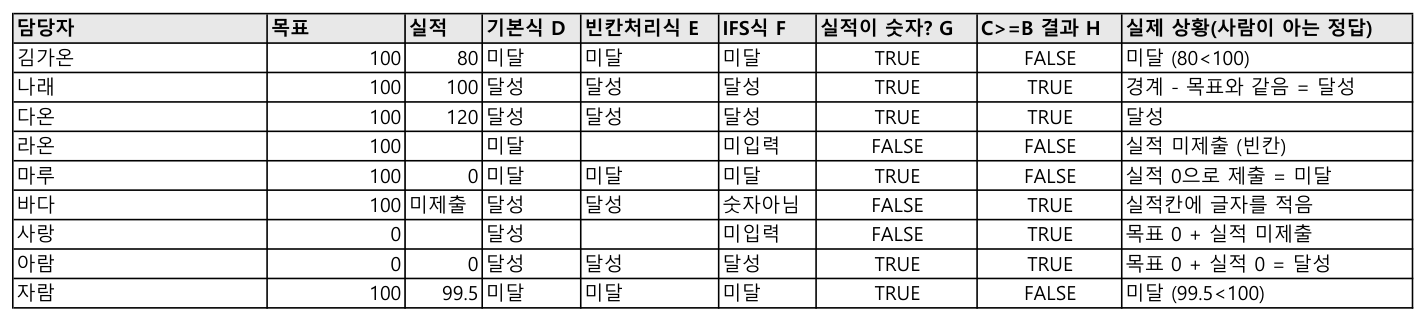
Column H is the true/false IF itself is looking at. If you want to know why IF answered the way it did, that is where to look.
Where the cells diverge
| Owner | Target | Actual | Basic D | Blank-aware E | IFS F | ISNUMBER | C2>=B2 | Real situation |
|---|---|---|---|---|---|---|---|---|
| 김가온 | 100 | 80 | 미달 | 미달 | 미달 | TRUE | FALSE | missed |
| 나래 | 100 | 100 | 달성 | 달성 | 달성 | TRUE | TRUE | boundary — equal counts as met |
| 다온 | 100 | 120 | 달성 | 달성 | 달성 | TRUE | TRUE | met |
| 라온 | 100 | (blank) | 미달 | (blank) | 미입력 | FALSE | FALSE | hasn't filed |
| 마루 | 100 | 0 | 미달 | 미달 | 미달 | TRUE | FALSE | filed a zero = missed |
| 바다 | 100 | 미제출 | 달성 | 달성 | 숫자아님 | FALSE | TRUE | words in a number cell |
| 사랑 | 0 | (blank) | 달성 | (blank) | 미입력 | FALSE | TRUE | hasn't filed |
| 아람 | 0 | 0 | 달성 | 달성 | 달성 | TRUE | TRUE | met |
| 자람 | 100 | 99.5 | 미달 | 미달 | 미달 | TRUE | FALSE | missed |
Three rows are the trouble.
라온 and 사랑 — a blank reads as zero. Neither of them filed anything, yet the basic formula handed 라온 「미달」 and 사랑 「달성」. For 라온, target 100, C>=B was FALSE; for 사랑, target 0, it was TRUE. Both results are explained if the blank is compared as a 0. Target 100 means 0>=100, missed; target 0 means 0>=0, met. Which is to say somebody who has submitted nothing at all gets a met stamp on any item whose target is zero.
바다 — text reads as larger than any number. With 「미제출」 written in the actual cell, C2>=B2 came out TRUE and the basic formula answered 「달성」. To see whether other text behaves the same, we tested eight variants against a target of 100 on a fresh sheet (target in column A, actual in column B).
| Text put in the actual cell | =IF(B2>=A2,"달성","미달") | B2>=A2 | ISNUMBER |
|---|---|---|---|
| 미제출 | 달성 | TRUE | FALSE |
| 휴직 | 달성 | TRUE | FALSE |
- | 달성 | TRUE | FALSE |
| a single space | 달성 | TRUE | FALSE |
0 (entered under text format) | 달성 | TRUE | FALSE |
| 없음 | 달성 | TRUE | FALSE |
| N/A | 달성 | TRUE | FALSE |
| 가 | 달성 | TRUE | FALSE |
All eight came out met. Whatever the text is, compared against a number the text side is larger. The most dangerous line is the fifth. Type a 0 into a cell whose format is 「텍스트」 (Text) and the screen shows 0 while IF answers met.
The blank-aware formula (E) screens out 라온 and 사랑 but not 바다. C2="" catches only blanks, never a cell holding text.
The counts
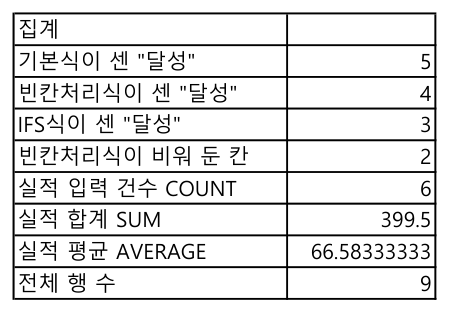
| What was counted | Value | Formula used |
|---|---|---|
| 「달성」 counted by the basic formula | 5 | =COUNTIF(D2:D10,"달성") |
| 「달성」 counted by the blank-aware formula | 4 | =COUNTIF(E2:E10,"달성") |
| 「달성」 counted by the IFS formula | 3 | =COUNTIF(F2:F10,"달성") |
| Cells the blank-aware formula left empty | 2 | =COUNTBLANK(E2:E10) |
| Actuals actually entered | 6 | =COUNT(C2:C10) |
| Sum of actuals | 399.5 | =SUM(C2:C10) |
| Average of actuals | 66.5833… | =AVERAGE(C2:C10) |
| Total rows | 9 | =COUNTA(A2:A10) |
The answer a human counts by eye is 3. The basic formula counted two extra (사랑, 바다) and the blank-aware formula one extra (바다). Two out of a 9-row table is 22% wrong.
The average carries the same trap. There are 9 rows but COUNT found only 6 actuals, so AVERAGE divides 399.5 by 6 rather than 9 and returns 66.58. Blanks and text are left out of the count. When you report an "average result", check separately what the denominator is.
The boundary and IFS
>= puts an equal value on the met side. That is why 나래's 100=100 came out 「달성」. We changed only the operator to >, added one more column in K, and counted again.
K2: =IF(C2>B2,"달성","미달")Met dropped from 5 (the basic formula D, >=) to 2 with the K formula (>). Three people moved to missed — 나래 (100=100), 사랑 (blank filed against target 0), and 아람 (0 filed against target 0) — leaving only 다온 (120) and 바다 (text) as met.
We did not run the same operator change on the exception-filtering IFS formula (F, met = 3) in Excel during this test. The result below is calculated from the values in the run log above.
M2: =IFS(C2="","미입력",NOT(ISNUMBER(C2)),"숫자아님",C2>B2,"달성",TRUE,"미달")라온, 사랑 and 바다 are caught by the C2="" or NOT(ISNUMBER(C2)) condition first, regardless of the operator, so only 나래, 다온 and 아람 ever reach the at-or-above comparison. Of those, 나래 and 아람 move to missed, so by calculation the 3 met under F drops to 1 (다온) under M. The same change — swapping >= for > — moves the count by a different amount depending on which formula you apply it to: 5→2 for the plain IF, 3→1 for the IFS that already filters out the exceptions. Whether the company standard is "at or above" or "above" moves the count by that much, so settle that before picking the operator.
IFS reads the conditions from the top and returns the answer of the first one that matches. To see whether order changes the result, we moved the at-or-above-target condition to the front.
L2: =IFS(C2>=B2,"달성",C2="","미입력",NOT(ISNUMBER(C2)),"숫자아님",TRUE,"미달")Met rose from 3 to 5. 바다 (text) and 사랑 (blank against a target of 0) were caught by the first condition and handed 「달성」, never reaching the not-entered and not-a-number conditions behind it. That is the same 5 as the basic formula. Put the exceptions anywhere but the front and there is no point using IFS at all.
A shape worth using
=IFS(C2="","미입력",NOT(ISNUMBER(C2)),"숫자아님",C2>=B2,"달성",TRUE,"미달")On a version without IFS, nest IF instead. Placed alongside on the same 9 rows, all nine gave the same answer as IFS.
=IF(C2="","미입력",IF(NOT(ISNUMBER(C2)),"숫자아님",IF(C2>=B2,"달성","미달")))When you count, do not count only met and missed — count the screened-out rows too and put them in the report.
=COUNTIF(F2:F10,"미입력")     → 2
=COUNTIF(F2:F10,"숫자아님")   → 1
=COUNTIF(F2:F10,"미달")       → 3
Met 3 + missed 3 + not entered 2 + not a number 1 = 9, which matches the total row count. If the four numbers do not add up to the row count, something has been left out.
What failed
- After drafting, we ran a fact check past GPT and the formula in the opening paragraph came back written as
=IF(B2>=A2,…). What we actually ran is=IF(C2>=B2,…), with target in column B and actual in column C. The column letters had been swapped, and we fixed it. - The same check flagged three sentences as untested guesses — "even 휴직 or a single
-gets counted as met", "with>나래 becomes missed", and "reorder IFS and the exception is caught first". We actually ran the eight text variants, the>formula and the reordered IFS to fill in the numbers, and all three sentences held up against the results. - The mistake in the first test was including only one text case, 「미제출」. Putting several in from the start would have finished it in one pass.
What we did not test
- We ran on one build only, Excel 16.0 build 20326. We did not check 2016 or 2019, Excel for the web, or Google Sheets.
- We did not look up how the comparison order between a blank cell and text is documented by Excel; the explanation in this note is our reading of what we observed across the 9 rows and the eight text variants.
- We did not count the same table with a pivot table or subtotals to see whether the numbers match.
- We did not put error values (
#N/A,#DIV/0!) in a cell to see how IF answers. - We did not check the counts when conditional formatting has colored the rows.
Related notes
- When an Excel formula will not calculate
- Comparing two lists in Excel — common entries and one-sided ones
- The order to clean an Excel table — merged cells, blank rows, text dates
Corrected 2026-09-28: Fixed the claim that changing >= to > moved the met count "from 3 to 2." The plain IF formula (D) actually goes from 5 to 2; the IFS formula that already filters out exceptions (F) goes from 3 to 1.