AI how-to notes · 2026-09-18 · last run 2026-09-18 · 한국어 원문
Pulling just the pages you need out of a PDF — a range, scattered pages, or one file per page
One line summary
Out of a 10-page PDF we pulled pages 3–5, then pages 1, 4 and 9, then all ten as ten separate one-page files. What Python produced matched the original in page count and in the text stamped on the pages. The surprise was the size. Taking 1 page out of 10 left a file that was 92.5% of the original, and the ten single pages added together came to 9.3 times the original. Pull pages with Edge's print dialog instead, with nothing installed, and the file does get smaller — but not one character can be found in it any more.
Who this is for
- Anyone who has to send two appendix pages out of a 30-page report
- Anyone who pulled pages out and wonders what they did wrong, because the size didn't budge
- Anyone who has to split a scanned bundle into single sheets and name them
Test environment
| Item | Value |
|---|---|
| OS | Windows 11 Home 25H2 (10.0.26200.9457) |
| Shell | PowerShell 7 / Git Bash |
| Edge | 153.0.4234.32 |
| Python | 3.12.10 |
| Python packages | pypdf 6.14.2, PyMuPDF 1.28.0 |
| Test file | A dummy PDF made for the test. No company material was used |
The file we tested with
We made one 10-page PDF. The 6-page photo document used for comparison later is a dummy from the same batch, and its photos are patterns drawn from random numbers. Every page carries big type such as 「3쪽」 (page 3), a heading like 「1장 개요」 (chapter 1, overview), and a marker reading 쪽표시 P03. Read that marker in an extracted file and you know instantly which page of the original it was. The file is 73,111 bytes.
Pulling pages with Python
pip install pypdf is the whole setup. All you do is list the page numbers you want.
from pypdf import PdfReader, PdfWriter

r = PdfReader(r"C:\path\source.pdf")
w = PdfWriter()
for page_no in [3, 4, 5]:            # the numbers a human counts
    w.add_page(r.pages[page_no - 1])  # Python counts from 0, so subtract 1
with open(r"C:\path\pages-3-5.pdf", "wb") as f:
    w.write(f)
We pulled all three this way: ① the run of pages 3–5, ② the scattered pages 1, 4 and 9, and ③ all ten as single pages. Then we compared page counts and the text on the first page against the original.
| What we pulled | Pages | First page | Page markers inside | Size | vs original |
|---|---|---|---|---|---|
| ① pages 3–5 | 3 | 3쪽 / 1장 개요 | P03, P04, P05 | 69,214 bytes | 94.7% |
| ② pages 1, 4, 9 | 3 | 1쪽 / 표지 | P01, P04, P09 | 69,206 bytes | 94.7% |
| ②-1 pages 9, 1, 4 | 3 | 9쪽 / 별첨1 도면 | P09, P01, P04 | 69,206 bytes | 94.7% |
| ③ one single page | 1 | 1쪽 / 표지 | P01 | 67,629 bytes | 92.5% |
| ③ ten single pages combined | 10 | — | P01 – P10 | 676,390 bytes | 925% |
(The first-page column quotes the stamps — cover, chapter 1 overview, appendix 1 drawing.)
Look at ②-1: the order you write is the order you get. Write the page numbers as [9, 1, 4] and page 9 comes first. Don't expect scattered pages to come back in their original order; write them in the order you want them.
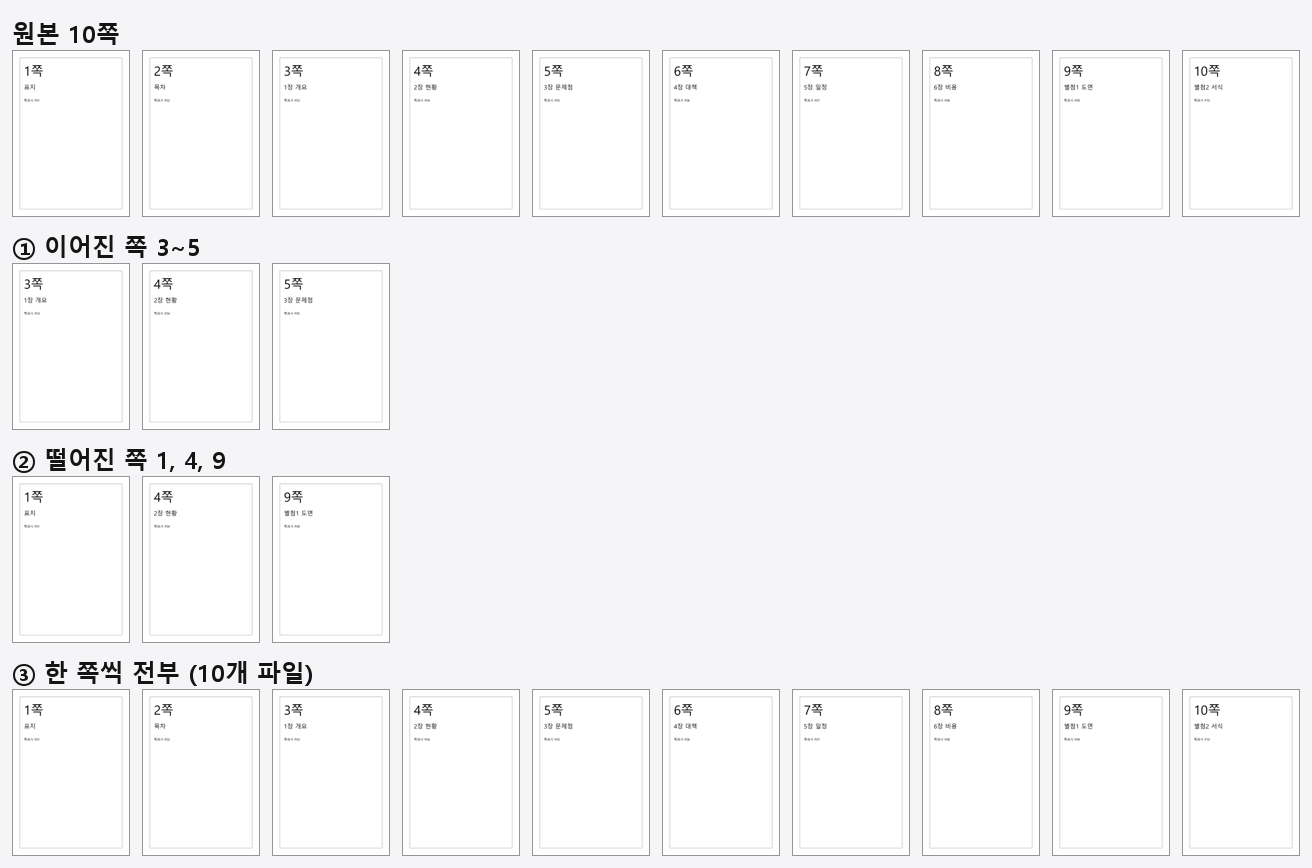
Splitting every page into its own file we ran like this.
from pypdf import PdfReader, PdfWriter

r = PdfReader(r"C:\path\source.pdf")
for i, page in enumerate(r.pages, start=1):
    w = PdfWriter()
    w.add_page(page)
    with open(r"C:\path\page_%02d.pdf" % i, "wb") as f:
        w.write(f)
There is a reason the file names are padded to two digits with %02d. Leave them as 1, 2, 10 and 10_ will sort ahead of 1_ when you later line them up by name, because the sort compares characters.
Why removing pages doesn't shrink the file
This is the part of this note that surprised us most. One page kept out of ten, and the size was 92.5%.
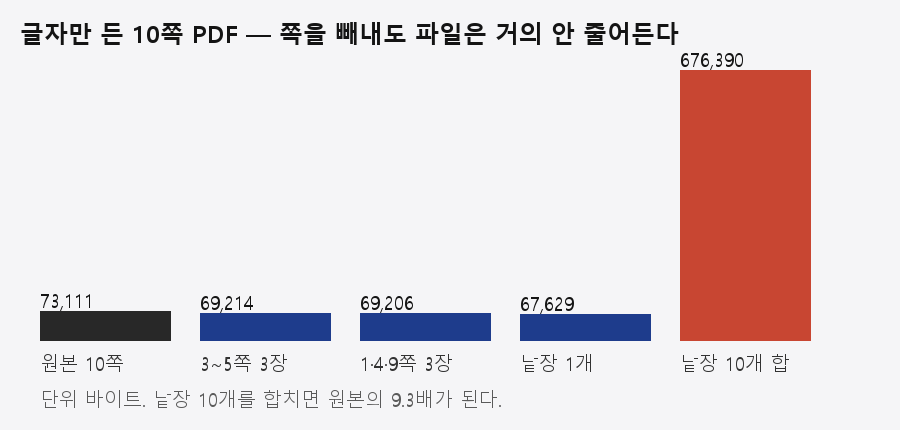
We opened the single-page file and counted what was taking up the room.
Y1_낱장_01.pdf   file 67,629 bytes   6 streams totalling 62,872 bytes
   largest stream   50,346 bytes  <</Filter/FlateDecode/Length 50346>>
      object pointing at it: /Type/Font ... /ToUnicode 7 0 R
   next largest     12,288 bytes  <</Length1 186933/Filter/FlateDecode/Length 12288>>
      object pointing at it: /Type/FontDescriptor ... /FontFile2 10 0 R
One set of a Korean font (12,288 bytes) plus the table mapping glyphs to Unicode (50,346 bytes) comes to 62,634 bytes together. 92.6% of the file is font housekeeping. Both sat in the original and in the single-page file at the same size. Which is why cutting the pages to a tenth did not cut the file to a tenth.
A PDF with photos in it is a different story. Put the two side by side and the difference is plain.
| Original | Pages pulled | Result size | vs original | Share by page count |
|---|---|---|---|---|
| 6 photo pages (39,305,252 bytes) | 1 | 6,619,981 bytes | 16.8% | 16.7% |
| 6 photo pages | 1 and 2 | 13,161,255 bytes | 33.5% | 33.3% |
| 10 text pages (73,111 bytes) | 1 | 67,629 bytes | 92.5% | 10.0% |
In the document where the photos carry the weight, dropping pages cut the size by the page's share. In the text document it did not. That may be the answer to "I halved the pages, why is it the same size?". These two files are all we tested. Guess which side your file is closer to by whether it has photos in it — but for the exact share you have to pull once and measure.
Pulling with PyMuPDF — pass the save options too
PyMuPDF (fitz) has select, which keeps only the pages you name. Save it with no options and the pages dropped to 3 while the size stayed at 99.9% of the original.
import fitz

d = fitz.open(r"C:\path\source.pdf")
d.select([2, 3, 4])                       # counted from 0, so pages 3-5
d.save(r"C:\path\pages-3-5.pdf", garbage=4, deflate=True)
d.close()
save (no options) 73,030 bytes (99.9% of the original)
save(garbage=4, deflate=True) 68,657 bytes (93.9% of the original)
pypdf 69,214 bytes (94.7% of the original)Add garbage=4, deflate=True and it came down to 93.9%. Forget the options and you get a file that has lost the pages and kept the size.
Pulling pages with nothing installed — printing from Edge
You can pull pages without Python. Open the PDF in Edge, press Ctrl+P, set the printer to 「Microsoft Print to PDF」, then type 3-5 into the bottom box under 「페이지」 (Pages). The number at the top of the print pane changes to 「합계: 3 용지」 — total, 3 sheets — and the preview starts at page 3.
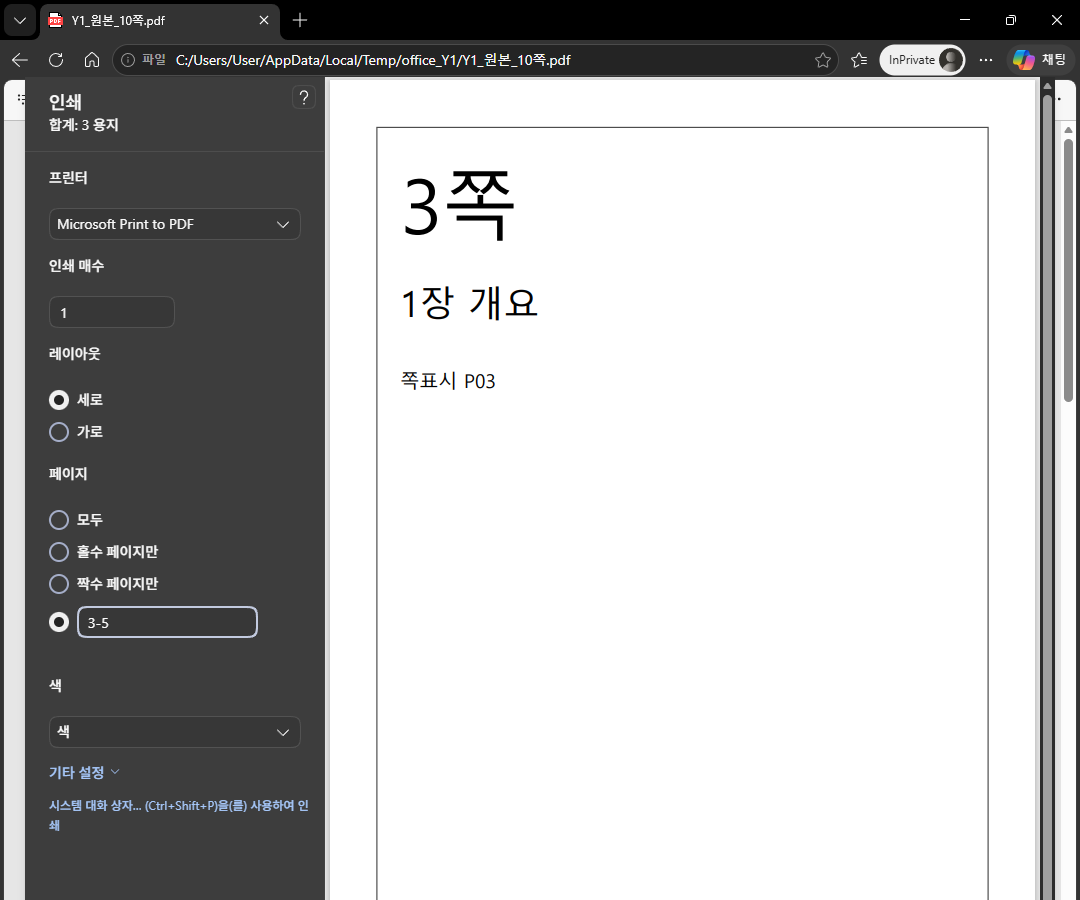
Press Print and it asks what to call the file. We measured what came out.
| Item | Original | Pages 3–5 via pypdf | Pages 3–5 via Edge print |
|---|---|---|---|
| Pages | 10 | 3 | 3 |
| Size | 73,111 bytes | 69,214 bytes | 11,219 bytes |
| Extractable text | yes | yes (P03, P04, P05) | 0 characters |
| Page size | 595.0000 x 842.0000 pt | 595.0000 x 842.0000 pt | 595.3200 x 841.9200 pt |
The size dropped to a sixth, and not one character can be found. Looking inside, there is no text and no image, only vector drawings.
pages 3-5 via Edge print, page 1
   characters 0 / character boxes 0 / images 0 / vector drawings 13
What we verified goes as far as 0 extractable characters. We did not click search or copy ourselves. Still, with no text in the file there is nothing for a search or a copy to catch, and nothing to pull out later if you want the table. For material that only has to be looked at, it makes no difference; if the person receiving it will search the document, this method is the one to avoid. The page size shifted too, by 0.32 pt across and 0.08 pt down.
Results
| What you want | Method | Result |
|---|---|---|
| A run of pages (3–5) | pypdf, or Edge's print range | Both give 3 pages. The pypdf file keeps P03, P04, P05; the Edge file has 0 extractable characters |
| Scattered pages (1, 4, 9) | pypdf with [1, 4, 9] | The order you write becomes the order you get |
| Every page separately | pypdf in a loop, names padded with %02d | 10 files. Added together, 9.3 times the original |
| When the size has to come down too | PyMuPDF select plus garbage=4, deflate=True | Still only down to 93.9% for a text document |
| When there is no Python | Edge Ctrl+P, page range, Microsoft Print to PDF | The 3 pages came out right, but 0 extractable characters on the first page and 13 vector drawings |
| Company material | All of the above finish on your own PC | No step uploads anything anywhere |
What failed
- We could not narrow "no text in the file printed from Edge" down to "because it's Korean". We did not run the same test on a PDF with English only.
- Building the dummy PDF the first time, we did not call
subset_fonts(), and 2 pages came to 13,602,850 bytes. Rebuilt with only the characters actually used, it was 63,924 bytes. - We clicked through Edge's print pane automatically while capturing the screen, and the save dialog showed a personal folder name, so that capture is in neither the note nor the raw data. The image here is a crop of the print pane.
- We never put the Edge printout and the original side by side on screen for a visual comparison. We measured only pages, page size and extractable text.
What we did not test
- Whether printing a page range from a viewer other than Edge also leaves no text.
- What happens when you pull pages from a password-protected or signed PDF.
- What happens to the bookmarks when you pull a middle page out of a bookmarked PDF; not measured in this note.
- How long it takes on a 100- or 1000-page file. What we tested was 10 pages and 6 pages.
- Whether the difference in page size is noticeable when the extracted file is opened in another viewer or on another PC.
- The percentages here come from these two dummies. Whether other PDFs give the same percentages, we did not check.